Troubleshooting
As with any programming language, you will inevitably run into problems when programming in R. This section discusses some common issues you may face when learning R and strategies to deal with them.
Common Problems
Syntax / spelling errors
The most common errors that all R users face are usually related to syntax. These can include, misspelling, typos and miss-matching parentheses. This kind of error is usually accompanied by an error message, a message displayed in the console which describes what R thinks produced the error. When R detects an error the program will terminate. If the name of an object has been misspelled or includes a typo, R will produce a message similar to the following,
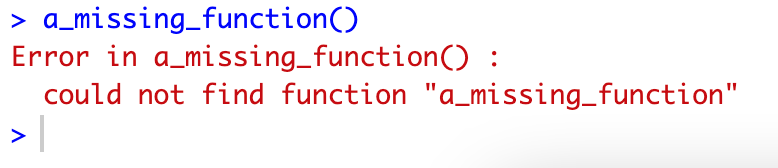
Usually such an error can be easily located (remember you can search your code using e.g., Ctrl+F on Windows). In some cases when there are many lines of code it may be difficult to find errors, in this case it helps to run each line of code one-by-one until you can locate the line containing an error. If you are certain that there are no mistakes and the error still occurs, check to see if the appropriate packages are installed.
If there are no typos and the error persists then it may be because you have not set a working directory and the object you are trying to access exists elsewhere. Check the files pane to see the working directory.
A related mistake is accidentally redefining the value of an object or assigning the same name to multiple objects. If you think this may have occurred it may help to clear all objects from the environment and re-run the code. To clear the environment, press the broom button, nominally located on the right hand side of the screen above the global environment.

Mismatching brackets
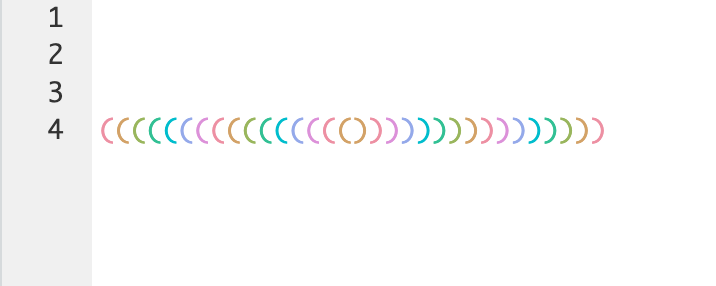
The frequent use of functions in R means that it can be common to have lots of parenthesis nested within one expression. If any of these parentheses are missing then this may produce an error or an incorrect output. Dealing with this kind of error usually means painstakingly matching all parentheses, to make this easier, you can enable rainbow parentheses. To enable them, go to Global Options in the Tools Menu, select Code -> Display then Use rainbow parentheses.
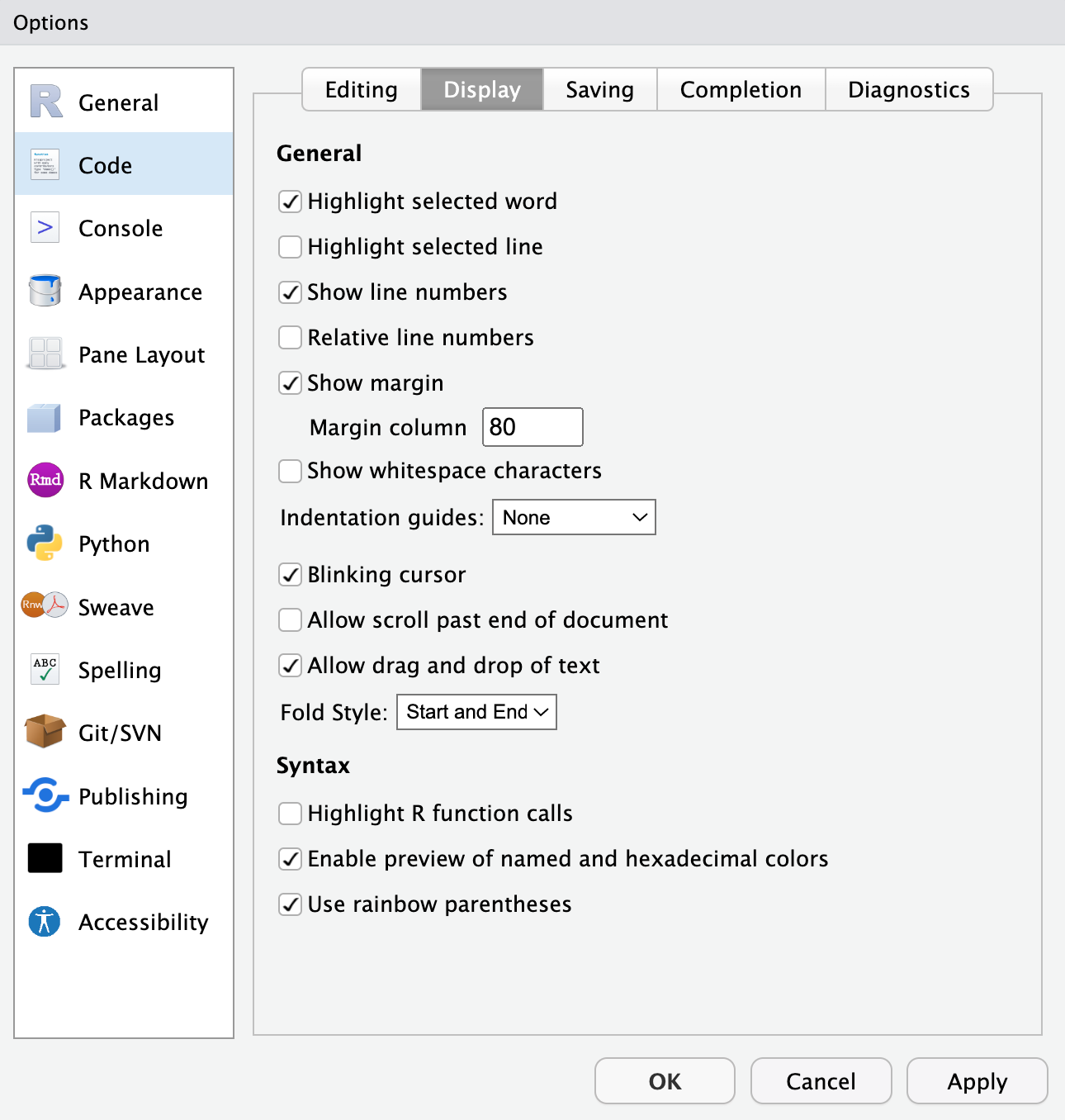
Parentheses will now be paired by colour.
Unexpected values
The presence of an error message enables us to locate and debug errors easily, however it can happen that R does not produce an error message even when a mistake has occurred, often this is the more difficult situation to deal with and is not due to a syntax error. In some situations, R will instead produce a warning message, similar to an error message, a warning message will be printed to the console, however R will not terminate the program. For example, asking R to evaluate the logarithm of a negative number will produce the following warning message
log(-1)## Warning in log(-1): NaNs produced## [1] NaNR has returned NaN, which stands for not a number. This
is what is produced by undefined mathematical expressions, and
represents an impossible value, such as
0/0## [1] NaNUndefined mathematical expressions can also produce ‘infinite’ values, for instance
1/0## [1] InfThe presence of both Inf ’s and NaN ’s
usually indicates that there is a mathematical error in your code.
You may also encounter missing values, which will appear as
NA. Some functions ignore missing values, and other
functions produce missing values as output when they encounter missing
values as input (this behaviour can oten be changed); so if you see an
NA, check the function arguments. For example:
data <- c(1,2,3,NA,4)
mean(data) #because of the NA, it returns NA
mean(data, na.rm=TRUE) #we can tell it to ignore the NA
Other problems and searching for help
If you run into an issue that you cannot resolve on your own, there are many ways to find help. Firstly, in class your lecturer can always help you resolve problems with your code, you can send them an email with a screenshot of your RStudio window and a description of the problem (or post a screenshot on the discussion forum, if it is not an assignment solution). A screenshot of your whole window is the most helpful information you can provide because it shows what you have tried, the variables in your environment, etc. You can typically press the ‘print screen’ key on your keyboard to take a screenshot, which you can then paste in an email.
There are also ways to resolve problems internally with RStudio, if
you need do not know how to use a particular R function you can find
information about the function by typing
help(function_name) into the console in RStudio or simply
?function_name. Similarly, if you are unsure of what the
structure of an object is you can use the function str()
with the name of the object as input. R will return information about
the object in the console.
If you encounter a strange/unfamiliar error message, you can try pasting that error message into google. You will likely see many results, not all of which are relevant, but by reading a few of the results you will often get the information needed to solve the problem. Typically, solutions are most often found on the Stack Overflow website.
Overview
Finally, if there are no error or warning messages and your code is not working then there may be a logical issue with your program. In this case, it can help to write down on a piece of paper what the code is doing at each step and check that the output is correct.
In general, the following check list should provide a useful guide to resolving some of the common problems encountered when programming in R
Check for syntax errors and typos
Check you have set a working directory
Read any error/ warning messages carefully to try and understand the cause of the error
Check the appropriate packages are installed
Run code in segments to locate mistakes
Check your mathematical expressions are well defined/ correct
Verify that function inputs are correct
Check that the logic of your code is correct