psql) to create some relations (tables), insert data into them and retrieve informationcreatedb application.createdb is a utility bundled with the PosgreSQL DBMS that can be launched from the command-line
[mwelch8@turing ~]$ createdb prac_01
psql interactive query client.psql is bundled with postgres and allows users to access the database via the command-linepsql expects at least one command-line argument, specifying the name of the database that you wish to access.
[mwelch8@turing ~]$ psql prac_01
psql (9.4.4)
Type "help" for help.

prac_01=>
psql utility has a full range of command-line options - please review the online documentation for additional info.psql commands.psql commands can be viewed by entering \?\dt to list the available relations\dv to list the available views\q to exit\copy to execute an SQL copy command to upload data\i to execute the commands in an SQL fileCREATE TABLE SQL command is used to specify a new relation by giving it a name and specifying its attributes and any initial constraints:
CREATE TABLE my_table(

    attribute_1   data_type,
    attribute_2   data_type

);
CREATE statement.DEFAULT <value> clause.NOT NULL clause:
CREATE TABLE department (
  dname        VARCHA(25) NOT NULL,
  dnumber      INTEGER,
  mgrssn       CHAR(9) NOT NULL,
  mgrstartdate DATE,
  PRIMARY KEY (dnumber),
);
PRIMARY KEY clause after the attribute declaration:my_attribute_name the_type PRIMARY KEY
CONSTRAINT my_constrain_name
    PRIMARY KEY(my_attribute)
UNIQUE clause can be used to specify alternate keys.
my_attribute_name the_type UNIQUE
my_attribute_name column with this constraint in placeFOREIGN KEY clause:
FOREIGN KEY (my_attribute) REFERENCES
    other_relation(other_relations_Attribute)
SET DEFAULT, SET NULL and CASCADEON UPDATE and ON DELETE
CREATE TABLE employee (
  fname    varchar(15) NOT NULL,
  minit    varchar(1),
  lname    varchar(15) NOT NULL,
  ssn      char(9) PRIMARY KEY,
  bdate    date,
  address  varchar(50),
  sex      char,
  salary   decimal(10,2),
  superssn char(9),
  dno      integer,
  foreign key (superssn) references employee(ssn)
        ON DELETE SET NULL ON UPDATE CASCADE,
  foreign key (dno) references department(dnumber)
        ON DELETE SET NULL ON UPDATE CASCADE
);
ON DELETE SET NULL and ON UPDATE CASCADE clauses on the Super_ssn will result in:
INSERT and COPY commands.INSERT command can be used to create individual rows of data in a table:
INSERT INTO my_table(attribute_1, attribute_2 ... attribute_n)
    VALUES (val_1,val_2 ... val_n);
Example:
INSERT INTO employee(Fname,Lanme,Dno,Ssn)
    VALUES ('Richard', 'Marini', 4, '5635633867');
COPY command.COPY command reads in data from a flat-file, such as a Comma Separated Values(CSV) file directly into the table.
COPY my_table FROM '/path/to/my/data/file.csv' CSV HEADER;
psql client, we have to use the \copy command:\copy my_table FROM '/path/to/my/data/file.csv' CSV HEADER;
\copy is a wrapper for the COPY command with the required permissions to import the data.DELETE command
DELETE FROM my_table WHERE <condition>
DELETE FROM my_table
The first exercise is to create a database for this weeks practical session. You should name your database \<your_une_username>_prac_01. For example my database will be created using:
[mwelch8@turing ~]$ createdb mwelch8_prac_01
Log into you database using the psql client and check that it has no relations using the \dt command.
[mwelch8@turing ~]$ psql mwelch8_prac_01
psql (9.4.4)
Type "help" for help.

mwelch8_prac_01=> \dt
No relations found.
mwelch8_prac_01=>
Now your ready to create some database tables. To start with we will create the tables for the Company database we have been working with throughout the lectures. The company database has 6 tables to create.
Go through one table at-a-time and copy/paste these DDL commands into the psql client to create the tables
CREATE TABLE department (
  dname        varchar(25) not null,
  dnumber      integer primary key,
  mgrssn       char(9) not null,
  mgrstartdate date
);


CREATE TABLE project (
  pname      varchar(25) unique not null,
  pnumber    integer primary key,
  plocation  varchar(15),
  dnum       integer not null,
  foreign key (dnum) references department(dnumber)
);

CREATE TABLE employee (
  fname    varchar(15) NOT NULL,
  minit    varchar(1),
  lname    varchar(15) NOT NULL,
  ssn      char(9) PRIMARY KEY,
  bdate    date,
  address  varchar(50),
  sex      char,
  salary   decimal(10,2),
  superssn char(9),
  dno      integer,
  foreign key (superssn) references employee(ssn)
        ON DELETE SET NULL ON UPDATE CASCADE,
  foreign key (dno) references department(dnumber)
        ON DELETE SET NULL ON UPDATE CASCADE
);

CREATE TABLE dependent (
  essn           char(9),
  dependent_name varchar(15),
  sex            char,
  bdate          date,
  relationship   varchar(8),
  primary key (essn,dependent_name),
  foreign key (essn) references employee(ssn)
);

CREATE TABLE dept_locations (
  dnumber   integer,
  dlocation varchar(15),
  primary key (dnumber,dlocation),
  foreign key (dnumber) references department(dnumber)
);

CREATE TABLE works_on (
  essn   char(9),
  pno    integer,
  hours  decimal(4,1),
  primary key (essn,pno),
  foreign key (essn) references employee(ssn),
  foreign key (pno) references project(pnumber)
);
Run a \dt command to check that all tables were created:
mwelch8_prac_01=> \dt
             List of relations
 Schema |      Name      | Type  |  Owner
--------+----------------+-------+---------
 public | department     | table | mwelch8
 public | dependent      | table | mwelch8
 public | dept_locations | table | mwelch8
 public | employee       | table | mwelch8
 public | project        | table | mwelch8
 public | works_on       | table | mwelch8
(6 rows)

mwelch8_prac_01=>
Now lets import some data into our database. We will be doing this use the \copy command. Take a quick look at the .csv files for the tables. Notice the row-and-column format of the data inside.
http://turing.une.edu.au/~comp389/workshops/prac_1/data/
Copy the data into each of the data tables using an appropriate copy command. Upload them in the order: department, employee, dependent, project, works_on, dept_location.
You can download the files to your home directory or reference them from the prac_1/data directory.
mwelch8_prac_01=> \copy department FROM '/home/mwelch8/Documents/COMP389/Pracs/p1/company/loader/department.csv' CSV;
Check the content of your tables using a simple SELECT query:
SELECT * FROM employee;
SELECT * FROM department;
SELECT * FROM dependent;
SELECT * FROM project;
SELECT * FROM works_on;
SELECT * FROM dept_locations;
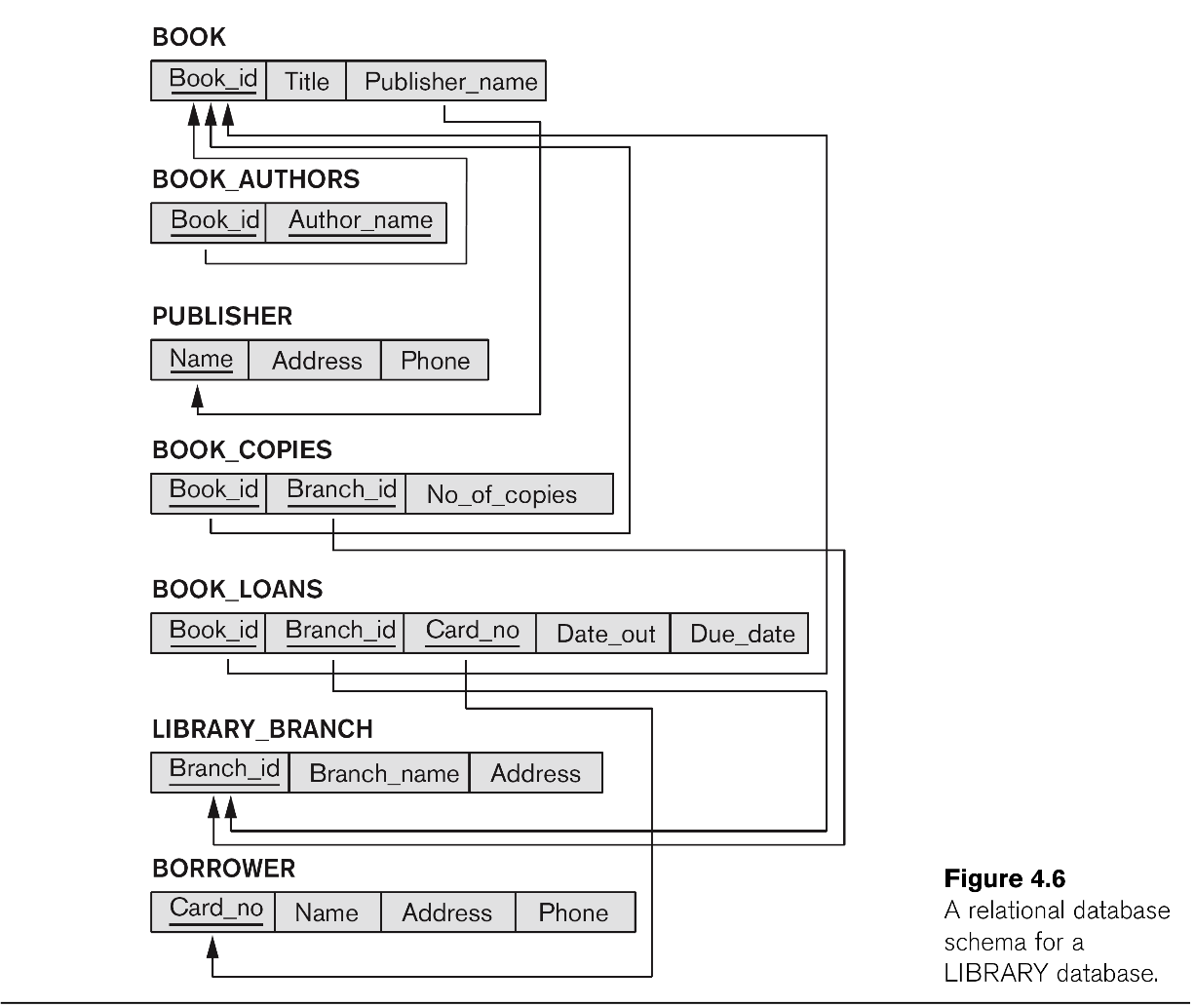
Review the relational schema presented here:
Construct appropriate SQL DDL statements to construct a relational database schema for the LIBRARY database. Make sure that you include:
Construct appropriate INSERT commands to insert some sample data into the LIBRARY database. What order do you need to load data into the tables? (Hint: start with the tables that don’t reference any other tables)
SELECT query is used to retrieve data from a relational database.
SELECT <attribute_list>
FROM   <table_list>
WHERE  <condition>
SELECT * FROM employee WHERE Dno=5;
DISTINCT operator can be used to remove duplicate records from being returned from the query.SELECT DISTINCT salary FROM employee;
ORDER BY clause.ORDER BY clause, ordering the results by the first attribute then second attribute and so on.
-- Retrieve the birth date and address for the emplyee
-- John Smith

SELECT bdate, address
FROM employee
WHERE fname = 'John' AND minit = 'B' AND lname='Smith';


-- This query demonstrates the use of a join condition
-- that links the tuple from the employee table to
-- those in the department table by the dnumber/dno

-- Return the name and address for all employees
-- who work for the Research department

SELECT fname, lname, address
FROM employee, department
WHERE dname='Research' AND dnumber='dno';


-- You can join tables back onto themselves

-- Return the first and last name along with the
-- immediate supervisor o each employee

SELECT E.fname, E.lname, S.fname, S.Lname
FROM employee AS E, employee AS S
WHERE E.superssn = S.ssn;


-- The AS clause can be dropped
-- Ordering used

-- Return a list of employees and projects they are
-- working on, ordered by department and within each
-- department, ordered alphabetically by last name
-- then first name

SELECT d.dname, e.lname, e.fname, p.pname
FROM department d, employee e, works_on w, project p
WHERE d.dnumber=e.dno AND e.ssn = w.essn AND
      w.pno = p.pnumber
ORDER BY d.dname, e.lname, e.fname;
Specify the following queries in SQL on the Company relational database the you created in the earlier exercise:
a. Retrieve the names of all employees in department 5 who work more that 10 hours per week on the ProductX project.
b. List the names of all employees who have a dependent with the same first name as themselves.
c. Find the names of all employees that are directly supervised by ‘Franklin Wong’.
Run the pg_dump utility to obtain a backup of the database you have created today.
[mwelch8@turing ~]$ pg_dump <username>_prac_01 > ~/db.sql
[mwelch8@turing ~]$ gedit ~/db.sql
CREATE statements look the same?